Choosing the right number of PABX extensions is an important step when setting up an office telephone system. Too few extensions can create communication problems, while buying more capacity than your business needs can increase equipment and installation costs.
For businesses in Bangladesh, the correct configuration depends on the number of employees who need telephone access, departmental requirements, external call volume, existing telephone infrastructure, and future expansion plans.
As a general rule, calculate the number of people and locations that need direct telephone access first. Then select a PABX system that supports those extensions and provides sufficient capacity for future growth. Remember that the number of extensions is different from the number of outside telephone lines.
This guide explains how to calculate your requirements, choose a suitable system, and avoid common mistakes when planning a PABX installation.
1. What Is a PABX Extension?
A PABX extension is an internal telephone endpoint or user connection managed by a private telephone exchange.
Each extension has an assigned number that allows users to communicate internally and, when permitted, make or receive external calls.
For example, an office might use the following extension plan:
| Department |
Extension Number |
| Reception |
101 |
| Managing Director |
102 |
| Sales |
103 |
| Accounts |
104 |
| Technical Support |
105 |
| Administration |
106 |
An employee can dial another extension directly without making an external telephone call.
Depending on the PABX system, extensions may connect to analog telephones, proprietary digital handsets, IP phones, or softphones.
Do extensions and telephone sets mean the same thing?
Not necessarily.
An extension is a logical or physical endpoint configured on the telephone system, while a telephone set is the device used to make and receive calls.
For example, an IP PABX may support softphone extensions used through compatible computers or mobile devices. A business may therefore have more extensions than physical desk phones.
The exact relationship depends on the system’s design, licensing, and supported devices.
2. How Many Extensions Does Your Office Need?
The answer depends on how your employees work.
Start by identifying:
- Employees who need individual telephone access
- Employees who can share a telephone
- Reception and management requirements
- Departmental telephones
- Meeting-room extensions
- Security and operational locations
- Remote employees requiring telephone access
Do not automatically assign one physical telephone to every employee. Some businesses need dedicated phones for everyone, while others can use shared phones or softphones.
Example: A Small Office With 10 Employees
Suppose a company has 10 employees distributed across several departments.
| Department |
Employees |
Suggested Extensions |
| Reception |
1 |
1 |
| Management |
1 |
1 |
| Sales |
3 |
3 |
| Accounts |
2 |
2 |
| Technical Support |
2 |
2 |
| Administration |
1 |
1 |
| Total |
10 |
10 |
In this example, each employee has a dedicated extension.
However, if two employees share a telephone or use a shared departmental extension, the required number of physical phones may be lower.
Practical tip: Prepare a list of employees, departments, and telephone locations before requesting a PABX quotation.
3. PABX Extension Requirements for 10, 20, 50, and 100 Users
The following examples illustrate how businesses can estimate extension requirements.
These are planning examples, not fixed industry standards. Your actual requirements may differ depending on employee roles, work patterns, and communication needs.
| Office Size |
Possible Extension Requirement |
Example PABX Capacity to Evaluate |
| 10 users |
10 extensions |
A system supporting at least 10 extensions |
| 20 users |
20 extensions |
A system supporting at least 20 extensions |
| 50 users |
50 extensions |
A system supporting at least 50 extensions |
| 100 users |
100 extensions |
A system supporting at least 100 extensions |
When selecting a system, verify whether the advertised capacity refers to physical extension ports, licensed users, registered devices, or another limit.
Also check whether expansion requires additional hardware or licenses.
Should You Buy a System With Extra Capacity?
Buying additional capacity can be sensible if you expect your business to grow.
For example, a company that currently requires 18 extensions but expects to reach 25 users may want to compare systems that support at least 25 extensions.
However, the decision should account for the cost of additional capacity and whether the system can expand economically.
Avoid purchasing a significantly oversized system without a clear business reason.
4. Understand the Difference Between Extensions and Outside Lines
One of the most common mistakes when buying a PABX is confusing extensions with outside lines.
Extensions are for internal users. Outside lines or trunks connect the PABX to external telephone services.
Consider an office with:
- 30 extensions
- 5 external calling channels
The system may support 30 internal endpoints while allowing up to 5 external calls simultaneously through those channels, subject to the PABX configuration and telephone service.
If all 5 channels are occupied, another employee may need to wait for an available channel to make an external call.
Example: Extensions vs Outside Lines
| Requirement |
Example |
| Employees |
30 |
| Internal extensions |
30 |
| External calling channels |
5 |
| Maximum simultaneous external calls through those channels |
5 |
The actual number of external calls may be affected by service-provider limits, system capacity, and configuration.
For IP PABX systems, external capacity may be provided through SIP trunks or other supported voice services.
How Many Outside Lines Should You Choose?
Estimate:
- How many incoming calls arrive during busy periods?
- How many outgoing calls do employees make simultaneously?
- How many calls does reception handle?
- Does the business have a dedicated sales or customer-support team?
- How long do calls typically last?
- How much waiting time is acceptable?
Businesses with high customer-call volumes may require more external calling capacity than offices with the same number of employees but fewer external calls.
5. How to Calculate Extensions for Different Departments
Instead of estimating extensions using employee count alone, create a departmental communication plan.
Reception
Reception usually needs a dedicated extension or attendant position.
Depending on the system, the receptionist may also need a suitable telephone or console that supports call transfer, hold, and other required functions.
Sales Department
Sales staff may require individual extensions if they make regular customer calls or need direct telephone access.
A shared telephone may be sufficient for some smaller teams, but individual extensions can simplify call routing and user management.
Accounts Department
Accounts staff may need direct extensions for suppliers, customers, and internal departments.
The number of extensions depends on how many employees require independent telephone access.
Management
Management may require individual extensions, call forwarding, conference calling, or other features depending on the PABX model.
Technical Support
A technical-support team may need several extensions and, for higher call volumes, features such as ring groups or call queues.
Meeting Rooms
A meeting room may require a dedicated telephone endpoint if staff regularly make conference calls or contact other departments from that location.
Security and Operational Areas
Factories, warehouses, hospitals, and large office buildings may require extensions at gates, security desks, reception points, or operational locations.
Important: Count actual telephone endpoints and user accounts according to the proposed system’s architecture. Do not assume every endpoint consumes capacity in the same way across all PABX models.
6. Analog PABX vs IP PABX: Does the Extension Calculation Change?
Yes. The basic planning process remains similar, but the technical requirements differ.
Analog PABX
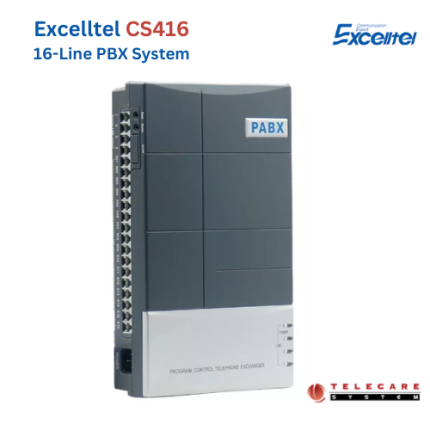
An analog PABX generally uses dedicated extension ports and compatible analog telephone sets.
When selecting a system, check:
- Available extension ports
- Maximum extension capacity
- Expansion-card requirements
- Compatible telephone sets
- Existing telephone wiring
- Available outside-line ports
For example, if your office needs 20 analog extensions, verify that the proposed configuration can provide at least 20 compatible extension connections.
TCS PABX
IP PABX
An IP PABX manages extensions over an IP network.
When selecting a system, check:
- Maximum supported extensions
- Simultaneous registration limits
- Licensing requirements
- Compatible IP or SIP phones
- Softphone support
- Network-switch capacity
- PoE requirements
- SIP trunk capacity
- Remote-user support
A system’s advertised extension capacity does not necessarily mean that every feature is available to every user without additional licensing.
Quick Comparison
| Requirement |
Analog PABX |
IP PABX |
| Extension connection |
Dedicated telephone port |
Network-based endpoint or supported device |
| Typical handset |
Analog telephone |
IP/SIP phone or softphone |
| Expansion |
May require additional cards or hardware |
May require licenses, hardware, or configuration |
| Remote extensions |
Usually more limited |
Often more flexible |
| Network planning |
Relatively limited |
Important |
| Capacity verification |
Check available ports and maximum capacity |
Check licenses, registrations, and system limits |
The right choice depends on the office’s current infrastructure, communication requirements, and plans for expansion.
7. How Much Extra Extension Capacity Should You Plan For?
Your PABX should ideally accommodate reasonable business growth without requiring immediate replacement.
Consider:
- Expected employee recruitment
- New departments
- Additional floors
- New branches
- More customer-facing employees
- Shared telephone locations
- Remote workers
- Future IP-phone adoption
Example
Suppose your office currently needs 20 extensions.
You expect to add five employees and establish a dedicated meeting-room telephone over the next two years.
Your projected requirement would be:
20 current extensions + 5 additional users + 1 meeting-room extension = 26 extensions.
You could compare systems that support at least 26 extensions, while also considering any additional capacity needed for other planned locations.
The appropriate amount of spare capacity depends on the cost of expansion and the likelihood of business growth.
8. Common Mistakes When Planning PABX Extensions
Avoid these common purchasing mistakes.
Mistake 1: Counting Employees but Ignoring Locations
A company may have 20 employees but need additional extensions for reception, meeting rooms, security, or shared operational locations.
Count the actual telephone endpoints required.
Mistake 2: Buying Too Few Extensions
A system with insufficient capacity may require additional hardware, licenses, or a replacement unit sooner than expected.
Mistake 3: Confusing Extensions With Outside Lines
Thirty extensions do not mean thirty simultaneous external calls.
Calculate internal endpoints and external calling capacity separately.
Mistake 4: Ignoring Telephone Compatibility
Not every analog, digital, or IP telephone works with every PABX.
Confirm compatibility with the exact model and required features.
Mistake 5: Ignoring Expansion Costs
Some systems require expansion cards or additional licenses. Others may need replacement hardware when capacity limits are reached.
Ask the supplier about the cost of increasing capacity later.
Mistake 6: Choosing a System Based Only on Price
The cheapest system may not support the required extensions, call features, telephone sets, or future expansion.
Compare quotations based on the complete configuration rather than the main unit’s price alone.
9. PABX Extension Planning Checklist for Bangladesh Businesses
Before buying a PABX, prepare the following information.
| Planning Item |
What to Confirm |
| Number of employees |
Current and expected future users |
| Required extensions |
Dedicated and shared telephone endpoints |
| Department requirements |
Reception, sales, accounts, support, and others |
| Outside-line capacity |
Expected simultaneous external calls |
| Telephone type |
Analog, digital, IP, SIP, or softphone |
| Existing cabling |
Whether telephone wiring or Ethernet can be reused |
| Required features |
Call transfer, IVR, forwarding, queues, and others |
| Future expansion |
Additional extensions and branches |
| Power backup |
PABX and related equipment |
| Installation |
Configuration, cabling, and testing |
| Maintenance |
Warranty, spare parts, and technical support |
For businesses in Bangladesh, also consider local technical support, equipment availability, power reliability, and the cost of future maintenance.
If you are planning an IP PABX, review network quality and security before installation.
10. Frequently Asked Questions
How many PABX extensions do I need for 10 employees?
If every employee needs an individual telephone endpoint, you may need 10 extensions. Additional extensions may be necessary for reception, meeting rooms, or operational locations.
How many PABX extensions do I need for 20 employees?
A business with 20 employees may need 20 extensions if everyone requires individual telephone access. Shared telephones or compatible softphones may change the number of physical telephone sets required.
How many PABX extensions do I need for 50 employees?
If every employee requires an individual extension, plan for at least 50 extensions. Also consider additional endpoints, future growth, and the system’s capacity limits.
How many extensions does a 100-user office need?
A 100-user office may need 100 extensions if every user requires individual access. The final requirement depends on shared devices, remote users, operational locations, and the PABX architecture.
Are extensions and outside lines the same?
No. Extensions connect internal users, while outside lines or trunks connect the system to external telephone services. The required capacities should be calculated separately.
Can multiple employees share one PABX extension?
Some workplaces can share a telephone endpoint, but this may limit independent calling and user-specific features. IP PABX systems may support additional arrangements, depending on the model and configuration.
Can I add more extensions to an existing PABX?
Often, yes, if the system supports expansion and sufficient capacity is available. Additional cards, licenses, telephones, or cabling may be required.
Does an IP PABX need a separate physical phone for every extension?
Not always. Compatible softphones and other supported endpoints may provide telephone functionality without a dedicated desk phone. Licensing and system limits should be checked.
How many outside lines does a 20-extension PABX need?
There is no fixed answer. Estimate the number of simultaneous external calls your business needs to handle during busy periods.
Should I buy a PABX with extra extension capacity?
Extra capacity may be worthwhile if your business expects to grow. Compare the upfront cost of a larger system with the cost and availability of future expansion.
Choosing the right number of PABX extensions starts with understanding how your business communicates.
Count the employees and locations that require direct telephone access, calculate external calling capacity separately, and confirm that the proposed system supports the required telephone sets and features.
For a small office, a relatively simple PABX configuration may be sufficient. A growing company with multiple departments, branches, or remote employees may need a more flexible IP PABX solution.
Before purchasing, confirm four things:
- The number of extensions required today.
- The expected number of extensions in the future.
- The number of simultaneous external calls required.
- The PABX’s actual capacity, compatibility, and expansion costs.
This approach helps businesses avoid unnecessary spending while ensuring that their telephone system can support daily operations.
Need Help Planning PABX Extensions for Your Office?
Telecare System can help you assess your office telephone requirements and identify a suitable PABX configuration.
Prepare your employee count, department list, required extensions, outside-line requirements, telephone preferences, and expected future growth before requesting a quotation. Contact us